Quick Filter Commands & Right-Click Menu!

Hello everyone! Our new slash (/) commands and right-click context menu feature that make filter management much more practical are now live.
What's New?
You no longer need to navigate through the settings menu to add or remove channels and members from your filters! We have added new ways for you to handle these actions in seconds:
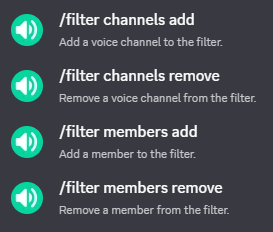
/filter channels add&/filter channels remove: Directly include or exclude specific voice channels from statistics tracking./filter members add&/filter members remove: Instantly add specific members to your statistic filters or remove them from the blacklist.- Quick Member Filter via Right-Click: Don't even want to type commands? You can now simply right-click on any user, navigate to the 'Apps' menu, and click on 'Toggle User Filter' to add or remove them from the filter with a single click.
Thanks to these new features, managing your server filters is now much faster and smoother.
Thank you, and enjoy your voice chats!